Your tickets live in the app
Your tickets are delivered to the Platinumlist app — there is no PDF. Install it, sign in with the email you booked with, and they will be there. About five minutes, start to finish.
Before you start
There is no PDF ticket
Your ticket is a QR code inside the app, and it refreshes every two minutes — a screenshot or a printout will not scan at the gate. Bring the phone you installed the app on, and bring it charged.
Your ticket may not appear straight away
Tickets for these matches are released to the app closer to match day. An empty Tickets tab today is normal and does not mean anything has gone wrong. Install now, sign in once, and your ticket will arrive on its own.
Install today. Your ticket will find you.
1Step 1
Install the Platinumlist app
Choose the option that matches your phone. We have pre-selected the one that looks right for the device you are reading this on.
Download the app file (APK)
Google Play does not work in mainland China, so we host the app file here on this page. It is 131 MB — use Wi-Fi if you can, and give it a few minutes. If the download stops, start it again: it carries on from where it left off.
Download the app · 131 MB- Tap the button above and wait for the download to finish.
- Open the downloaded file — from the notification, or in Files → Downloads.
- If your phone warns you about “unknown sources” or “unknown apps”, tap Settings, switch on “Allow from this source”, then go back.
- Tap Install, then Open.
Only download the file from this page. Anything calling itself a Platinumlist app anywhere else is not ours.
Get it from AppGallery
On a Huawei phone, open AppGallery and search for Platinumlist. Tap Install, then Open.
Open AppGalleryGet it from Google Play
In Hong Kong, Google Play works as usual. Search for Platinumlist, tap Install, then Open.
Open Google PlayGet it from the App Store
The App Store works normally in China. Search for “Platinumlist: Events & Tickets”, tap Get, then Open.
Open the App StoreSteps 2 to 6 · inside the app
From the app icon to the turnstile
The app itself runs in English or Arabic, so the screen on your own phone will be the English one. Use the switch under any phone to read it in Chinese instead — and the key beside each screen gives you the English word you will actually be tapping.
2Step 2
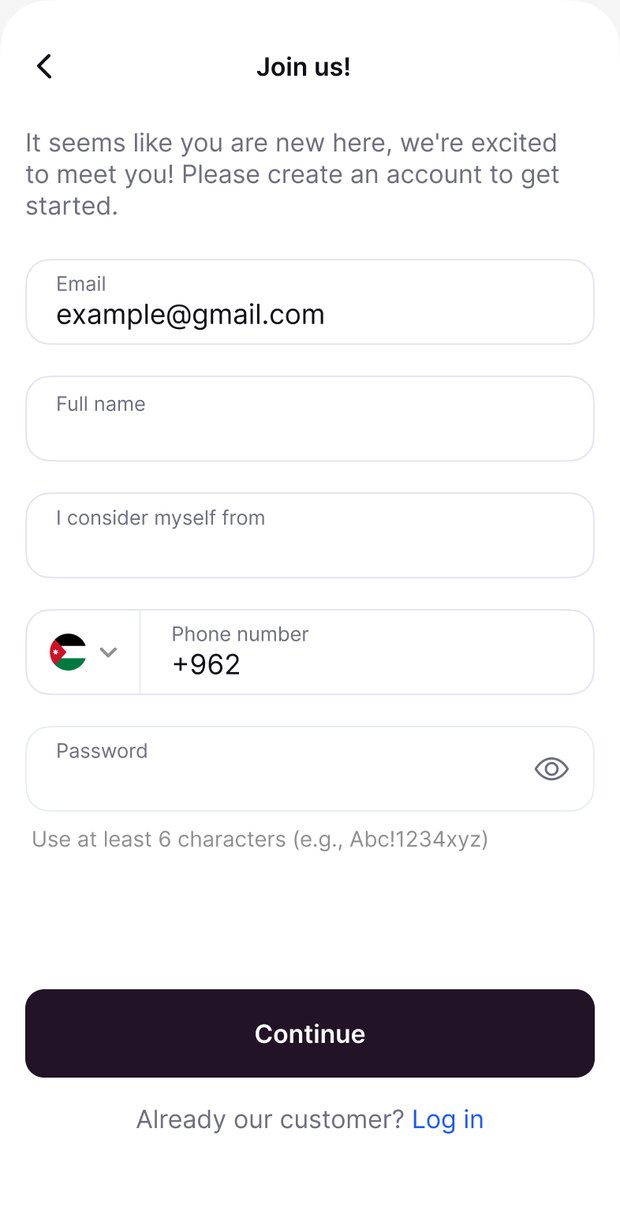
Sign in with your booking email
Use the exact email address you gave when you booked — that is the address your ticket is attached to. If the app says it does not know you yet, tap Sign up with that same email. Either way you end up in the same account.
Different email, no ticket. Not sure which address you used? Check the message the organiser sent you — it went to the same one.
Words on this screen
- 电子邮箱
- Full name
- 姓名
- Password
- 密码
- Continue
- 继续
- Log in
- 登录
3Step 3
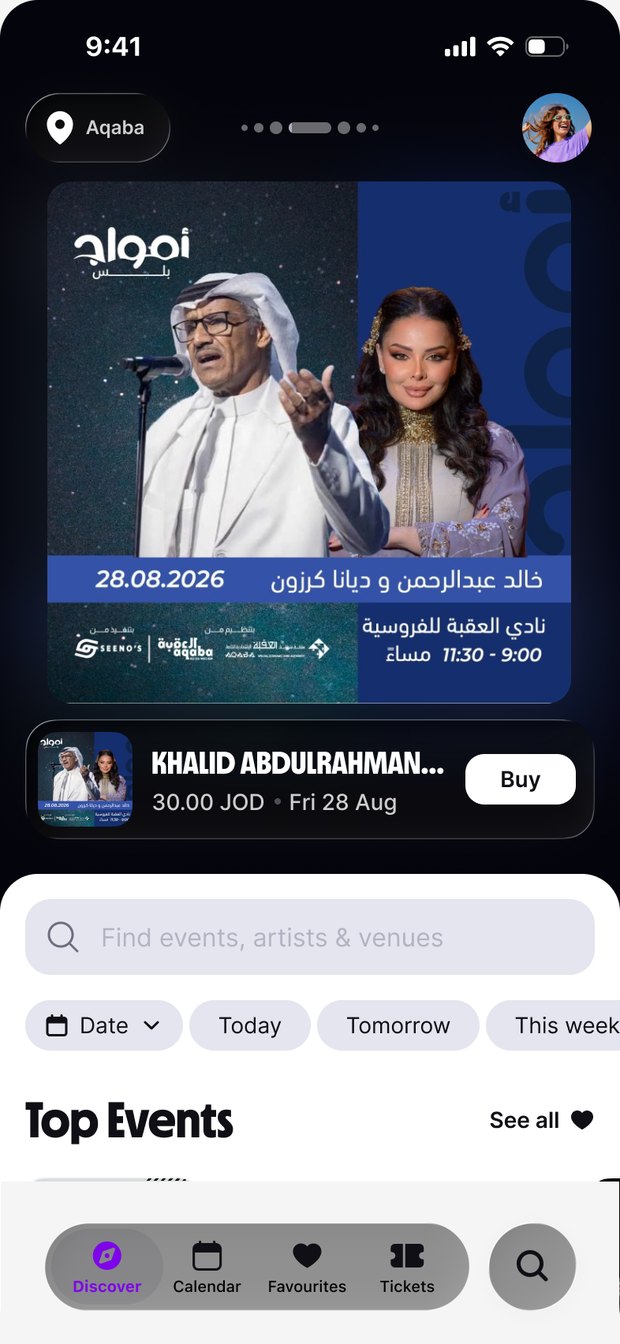
Open the Tickets tab
It sits in the bar along the bottom of the screen — Discover, Calendar, Favourites, Tickets. Tap Tickets.
Words on this screen
- Discover
- 发现
- Calendar
- 日历
- Favourites
- 收藏
- Tickets
- 门票 — 点这里
4Step 4
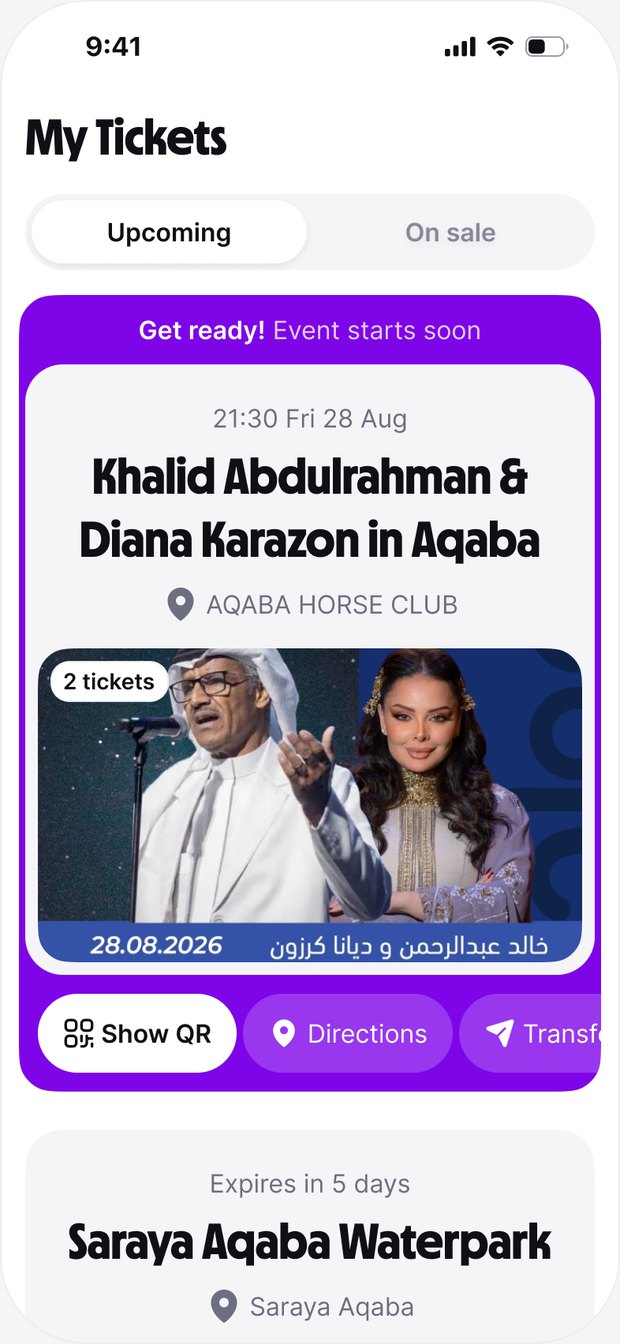
Find your match under Upcoming
Every ticket you hold is listed here. Tap the match you are going to. If the list is empty, pull it down to refresh — and see the note above about release timing.
Words on this screen
- My Tickets
- 我的门票
- Upcoming
- 即将到来
- On sale
- 转售中
- Show QR
- 显示二维码
5Step 5
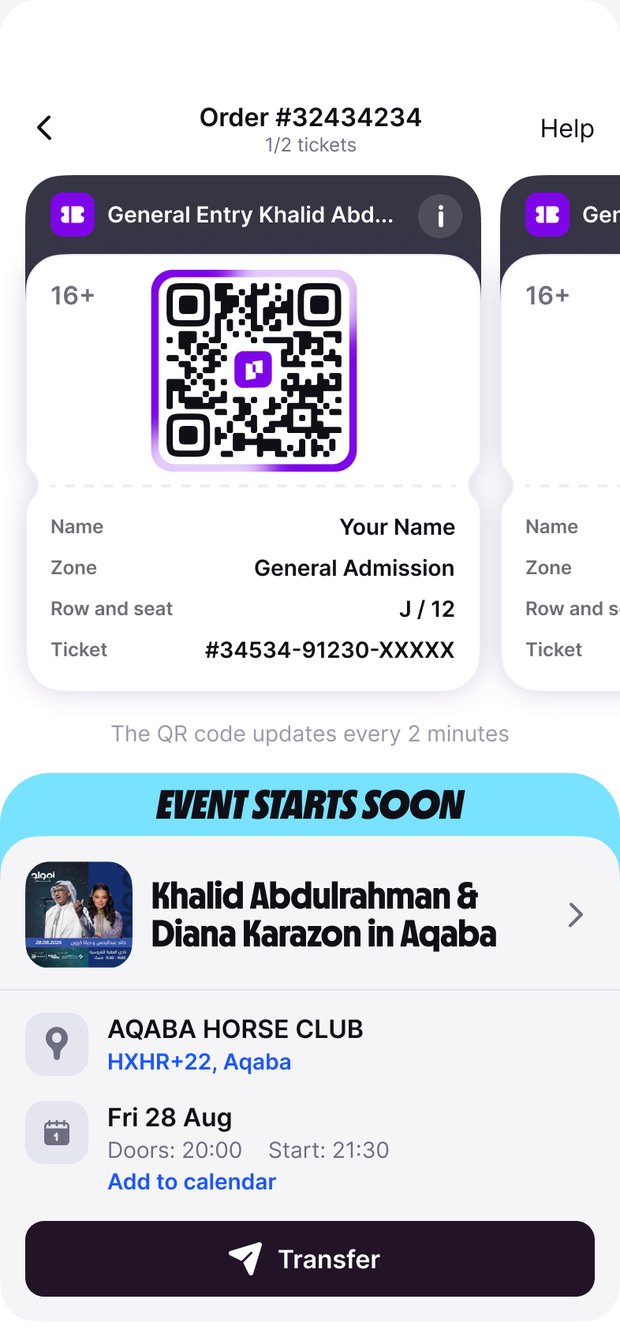
Tap Show QR at the gate
Hold the screen up to the scanner. One QR code per ticket — if you are bringing friends, swipe across to the next card and scan each person in turn. Turn your screen brightness up.
Words on this screen
- General Entry
- 普通入场
- Zone / Row and seat
- 区域 / 排号与座位
- Event starts soon
- 活动即将开始
- Transfer
- 转赠
6Step 6
Everything else is on the ticket
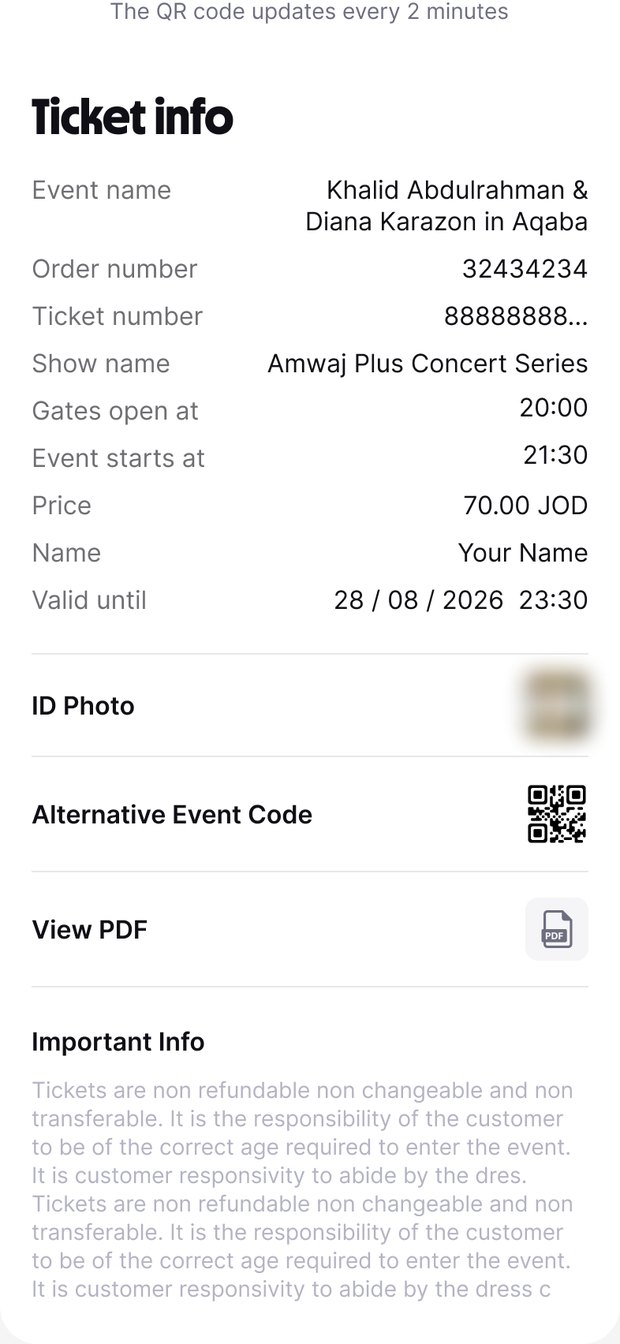
Tap the info icon for your order number, ticket number, the name on the ticket, gate opening time and kick-off.
Words on this screen
- Ticket info
- 票务信息
- Order number
- 订单号
- Gates open at
- 入场口开放时间
- Event starts at
- 开赛时间
- Valid until
- 有效期至
Watch it instead
The whole thing, filmed inside the app
The same six steps, recorded on a real phone. The captions on this cut are Arabic — the Chinese and English versions are being recorded now. The buttons sit in exactly the same places, so it is worth watching either way.
Hosted on this page rather than on a video platform, so it plays from mainland China without a VPN. It only downloads when you press play.
No PDF. No printout. Just your phone, charged.
Questions
If something does not look right
Check three things, in this order. One: you are signed in with the email you booked with. Two: pull down on the Tickets screen to refresh. Three: tickets are released closer to match day, so being early is the most likely answer. Nothing is lost.
Android blocks app files from outside a store until you allow it. When the warning appears, tap Settings, switch on “Allow from this source”, then go back and tap Install again.
It will not work — the code refreshes every two minutes. Bring the phone you installed the app on, signed in, and charged.
They all sit in the same order. Swipe across the QR cards to move from one to the next, and scan each person in separately.
Not yet — the app runs in English or Arabic. This page carries the Chinese, including a short key to the words on each screen. There are only four buttons you actually need, and they are marked on the screens above.
Connections between China and our servers can be slow. Give it longer than you would expect and use Wi-Fi where you can. Doing all of this at home a few days before the match, rather than at the gate, is time well spent.
Still stuck
Talk to a person
About your booking
Reply to the message you were sent about your booking, with your order number and a screenshot of what you are seeing. The team who sold you the ticket answers fastest on this.
About the app or your ticket
Write to our help centre with your order number. English or Arabic, any time — we read every message.